PAN files (modules)
How to upload a manufacturer PAN file to use a specific solar module in SolarLayout.
A PAN file is the industry-standard format for solar module specifications. Most major manufacturers publish PAN files on their download pages alongside the datasheet.
Upload the PAN file once and SolarLayout reads the module's identifying, electrical, geometric, and bifacial characteristics from it.
Where to get a PAN file
The cleanest source is the manufacturer's product page. Search
for the exact module SKU (e.g., "Mono PERC 540W PAN") and
look for a .PAN download next to the datasheet PDF.
If you can't find one, request the PVsyst .PAN file from your
module manufacturer — most major manufacturers provide them on
request, sometimes via:
- the product / downloads page, next to the datasheet PDF;
- a partner / installer portal, or your local distributor;
- the manufacturer's technical support form (not always on the public site).
If you can't find a PAN file for the module you need:
- The manufacturer's local technical / application engineering team usually has them — email them.
- Larger EPCs maintain internal PAN libraries.
- If an admin has published a similar module to the managed catalog (it carries a Managed chip), it can serve as a stand-in — see System vs User libraries.
How to upload
Open the Resource Library
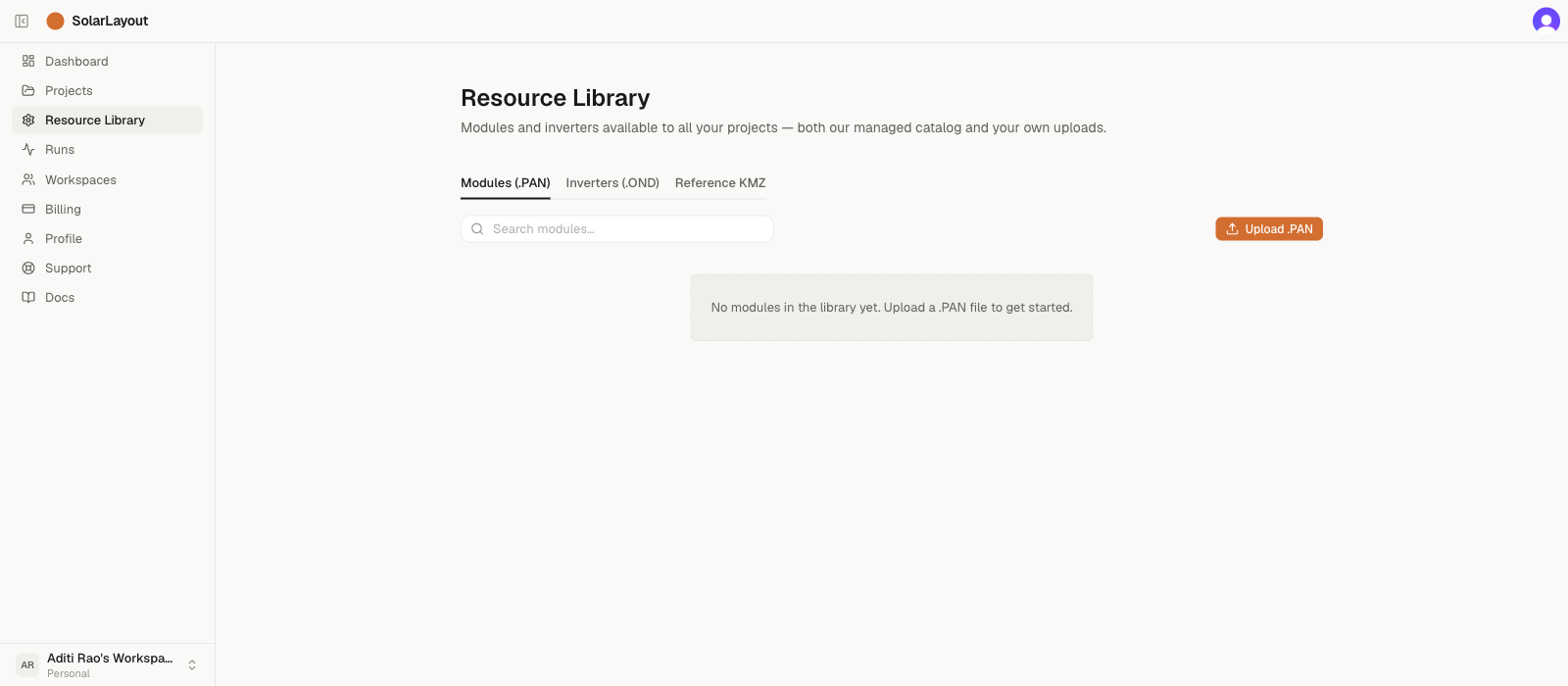
In the Dashboard sidebar, click Resource Library. The page opens with the Modules (.PAN) tab selected. The table lists any managed (Managed-chip) rows an admin has published plus your own uploads. By default the managed catalog is empty, so a new account sees only its own uploads — until you upload your first file, the table shows an empty state.
Click Upload .PAN
The button is in the table toolbar, top-right. A file picker
opens, filtered to .PAN files (case-insensitive).
Select the file and wait for parse
SolarLayout reads the file on the server, extracts the fields below, and adds the new row to your account library. The button shows "Uploading…" while the request is in flight.
The file size cap is 256 KiB — well above the typical 1–4 KB
of a .PAN file, but enough to catch the common mistake of picking
a datasheet PDF by accident.
Confirm the new row in the table
The uploaded module appears at the top of the Modules (.PAN) tab (no Managed chip — it's your own upload). The row shows the module name, Pnom rating, and — in the Bifacial column — a chip reading the bifaciality factor as "φ 0.70" (for example) when the file declares one, or "Yes" if it's bifacial with no numeric factor. Sanity-check the Pnom against the datasheet before using it in a project.
The table doesn't show a full parsed-field breakdown today — only the Module name, Pnom, and Bifacial columns. If the Pnom looks wrong, you likely picked the wrong file.
What SolarLayout reads from a PAN file
The PAN format is a key=value text file inside PVObject_=pvModule
blocks. SolarLayout's importer extracts these fields:
| PAN field | Used for |
|---|---|
Manufacturer (required) | Display + search |
Model (required) | Display + search |
PNom (required) | Module Pnom in Wp — capacity calculation |
Width, Height | Module geometry — table layout, GCR |
Weight | Display only |
NCelS × NCelP | Cell count (e.g. 132 for half-cut twin) |
Technol | Cell technology (mtSiMono, mtSiPoly, etc.) |
muPmpReq | Power temperature coefficient (%/°C) |
Isc, Voc, Imp, Vmp | STC electrical characteristics |
BifacialityFactor | Bifacial rear-side production factor |
VMaxIEC | Max system voltage (V) |
YearBeg | First manufacturing year |
Manufacturer, Model, and PNom are the only required fields —
if any of those is missing the upload is rejected. Every other field
is optional and is stored as null if absent.
Other PAN fields (IAM curves, low-irradiance behaviour, etc.) are not read by SolarLayout today. They're preserved in the original file (still downloadable from the catalog), and may be used by future features such as the energy-yield model.
Common PAN upload issues
If your upload is rejected:
- "Not a valid PAN file (PVObject_=pvModule header missing)" —
the file doesn't contain the
PVObject_=pvModuleheader. Either the file is the wrong type (often an inverter.ONDmis-named, or a.PANexported from a non-standard tool). Re-export the file or get a fresh one from the manufacturer. - "Required field missing:
Manufacturer" (orModel, orPNom) — the file is structurally valid but is missing one of the three required identifiers; the message names the specific field. Open it in a text editor (PAN is plain text) and check the top of thepvModuleblock; if the value is there but mis-named, the file is non-standard and you should ask the manufacturer for a clean export. - "
<filename>is<size>— too large for a .PAN file." — files over 256 KiB are rejected. The full message reads "…too large for a .PAN file. .PAN and .OND files are typically 1–4 KB. Make sure you've picked the actual .PAN file (not a datasheet PDF or other document)." If you're seeing this you almost certainly picked a datasheet PDF or other document by mistake.
See Uploading your own hardware for the general workflow.